
| | |

Quick Tip: Manage Call List with Google Maps
Note: This article was published while I was in my early 20s. I was much younger and dumber. Please don't hold it against me. One of the perils of having a 20+ year old website!

This year I resolved to be more aggressive in getting clients, my marketing campaign, and my business in general. a few days ago I started compiling a list of business in my target market to reach out to. I decided to choose Google Maps to create a custom map of  those business. Here’s the Why & How.

Why?

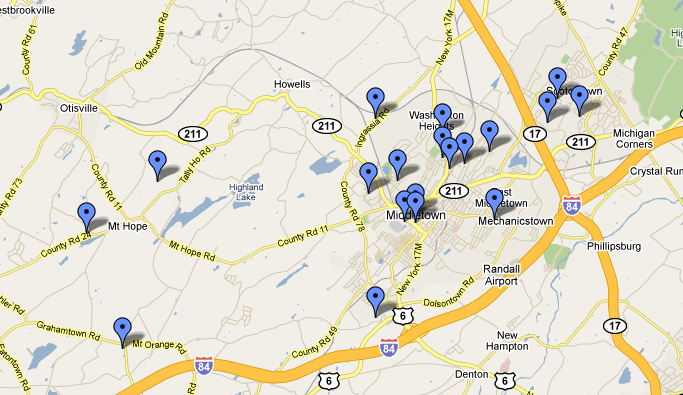
You need a way to manage the potentials. Things you should record are Name, Address, Phone Number, and Website. These are things that Maps keeps track of. But instead of  the information being in an excel sheet, they are plotted on a map- this adds an extra piece of information: Your Footprint. You can now view how far your target reach is, where each business is relative to you, and where each business is relative to each other.

How?

The how is easy:

  1. First, make sure you’re logged in to your Google Account. Head on over to maps.google.com
  2. Click on “My Maps” next to the “Get Directions” link in the top left corner.
  3. Click “Create New Map” and name it “Call List.” Click Save
  4. Now search for businesses. I usually do “<type of business> <city, state>”
  5. Click on one at at the bottom of the information bubble, you’ll see “Save to.” Save it to your new map.
  6. Add a few and view your map!

Similar Posts

  • | |

    Manifest Development Redesign 2011: The Homepage

    Note: This article was published while I was in my early 20s. I was much younger and dumber. Please don’t hold it against me. One of the perils of having a 20+ year old website![singlepic id=7 w=320 h=240 float=right] Last week I launched a redesign of my freelance site, Manifest Development. I started developing it in…

  • Books Recap for July 2019

    In August I finished 3 books and read about 970 pages. That brings my grand total up to 20 books. I was hoping to hit my goal of 21 in July, but my current book is a grind, and finding time to read it has been equally difficult. Let’s take a look!

  • 4/5- Picasa 2

    Note: This article was published while I was in my early 20s. I was much younger and dumber. Please don’t hold it against me. One of the perils of having a 20+ year old website! Ahh, yes, Google’s Picasa. It is a free photo editor/manager from Google- and it is simple wonderful. Basically what it…

  • | |

    Safe Social Media: Twitter

    Note: This article was published while I was in my early 20s. I was much younger and dumber. Please don’t hold it against me. One of the perils of having a 20+ year old website!The first installment of the Safe Social Media Series is on the three year old web service and recent internet sensation,…

  • The Business

    Note: This article was published while I was in my early 20s. I was much younger and dumber. Please don’t hold it against me. One of the perils of having a 20+ year old website!I seldom write about JLC Web Design on this site. Really, it’s only when I am doing a write up on…

  • |

    Validate an Idea With an Email Form

    If you’re anything like me, you get super excited about an idea and want to build it right away. But I’m here to tell you that’s not the best way to spend your precious time. Spend some time validating an idea so you don’t waste time executing a bad one. I know this from experience….
