
|

WordPress Helper Functions for Detecting IE

The other day I was working on a problem where I wanted to check if a website was using a specific browser (in this case IE) and version (in this case 9 or below). I came up with 2 functions that would serve an a nice, reusable check for both. These can also be extended to check for other browsers or versions, or even accept custom regular expressions.

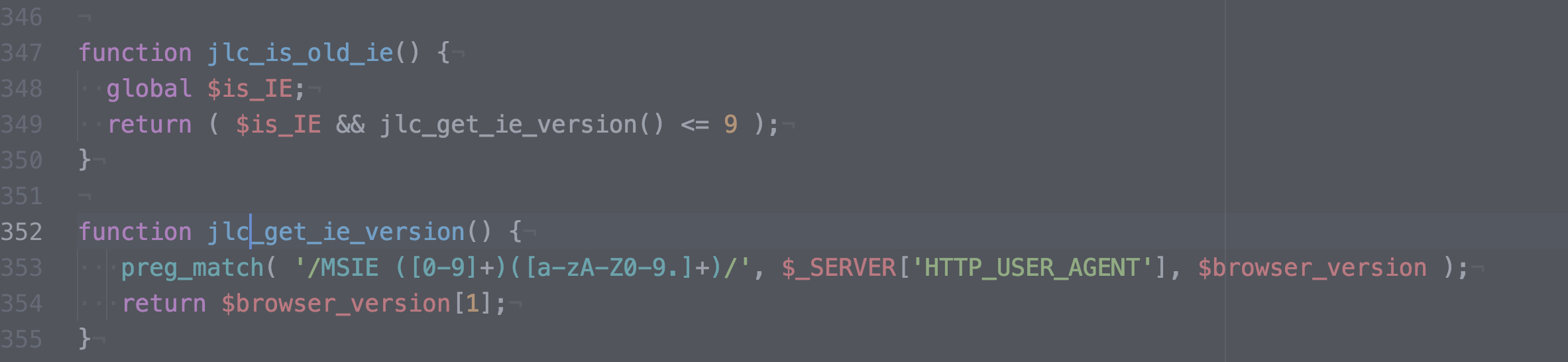
Before I get started, it’s worth noting that WordPress actually has built-in checks for these already: WordPress Browser Detection Booleans. I used these in conjuction with a function I wrote to detect “old” versions of IE:

function jlc_is_old_ie() {
  global $is_IE;
  return ( $is_IE && jlc_get_ie_version() <= 9 );
}

This function uses a combination of WordPress' built-in $is_IE and use of another function that I wrote to grab the version from the user agent, with help from this WPBeginner tutorial.

function jlc_get_ie_version() {
   preg_match( '/MSIE ([0-9]+)([a-zA-Z0-9.]+)/', $_SERVER['HTTP_USER_AGENT'], $version_no );
   return $version_no[1];
}

This looks for MSIE before a number or letter and numbers and returns the number/letters and numbers found. It's worth noting that this only works for older versions (pre-11) IE. That uses the term Trident in it as well as "Mozilla," but as this blog post points out, User Agent (UA) isn't always the best method. I use it here for 2 reasons: I wanted to specifically target older versions of IE and I'm not changing any specific features; I'm added classes to the body and displaying a message to older browsers that, "Hey, things will definitely look weird for you."

Similar Posts

  • Tools I’m Using to Avoid Spoilers

    Between a certain Game of Thrones and Avengers: Endgame, I’ve been seeing many complaints about things being spoiler on social media. Even with the lengths I went through when Infinity War came out, it was still spoiled because a careless YouTuber (me) let autoplay happen unregulated, and another YouTuber (the guy in the video) opened…

  • | |

    Hosted Platform vs. Your Own Platform: How Do You Choose?

    When I was in grammar school (or primary school, depending on where you live), we had a fenced-in slab of pavement where the students could play during recess. It was…kinda boring, but it was highly unlikely we’d get hit by a car. We were protected. There was also this HUGE, open field across the street….

  • How Do I Learn Web Development?

    A couple of years ago, I was on the How to Hold a Pencil podcast (episode here) and we discussed a number of things, including the steps I took to learn web development (over 14 years ago…whoa). I’m often asked, as I was on the show, what I recommend for people starting today. Here’s my…

  • |

    WP Engine Easter Egg Saves You 20%

    I got a hot tip in my inbox today from one of my favorite hosting companies, WP Engine. For a limited time, when you visit their website and put in the Konami Code (below), you’ll save 20% on your purchase. To activate this discount, enter the following code using arrows and letters on their keyboard when…

  • Quick Tip: How to Move a WordPress Site

    Note: This article was published while I was in my early 20s. I was much younger and dumber. Please don’t hold it against me. One of the perils of having a 20+ year old website!I won’t go too in-depth here, but I will describe the steps you need to take to move a WordPress website…

  • Inaugural NEPA WordPress Meetup

    I know I haven’t been on in a while, but it’s for good reason: I’ve been busy movin’ and shakin’ and WordPressin’. My friend and co-worker Phil Erb and I have put together a WordPress Meetup here in Scranton and we’re very excited to announce that the first one is this Tuesday, February 19th.