
The Best Home Automation Device of 2021: Lutron Aurora Dimmer Switch
I love to automate everything. Sometimes it’s overkill. But it usually results in some cool things. With Shortcuts being available on the Mac now, for example, I can push a button on my Stream Deck, set the lighting in my office for recording, put my phone into the Recording Focus Mode, and set my “podcast recording”timer in Toggl.
But this isn’t about any of that1. This is about a general home automation device. The best one I’ve seen all year: the Lutron Aurora Smart Bulb Dimmer Switch.
A Smart Home Device for People Who Don’t Like Smart Devices
One of my goals when we bought our house was to basically connect everything to the internet that could be. My only requirement is it works with both HomeKit and Alexa2. Phillips Hue lights fill that requirement nicely.
So I installed smart bulbs everywhere. And I quickly realized a problem that some great automators of our time have warned of: people will still use the switches and knobs to which the blubs are attached, rendering them useless. This could be kids, parents, or energy conscious visitors who don’t know you have a voice controlled home.
And let me tell you: messing around with electrical boxes to install smart switches is not my favorite thing.
That’s where the Lutron Aurora Smart Bulb Dimmer Switch comes in.
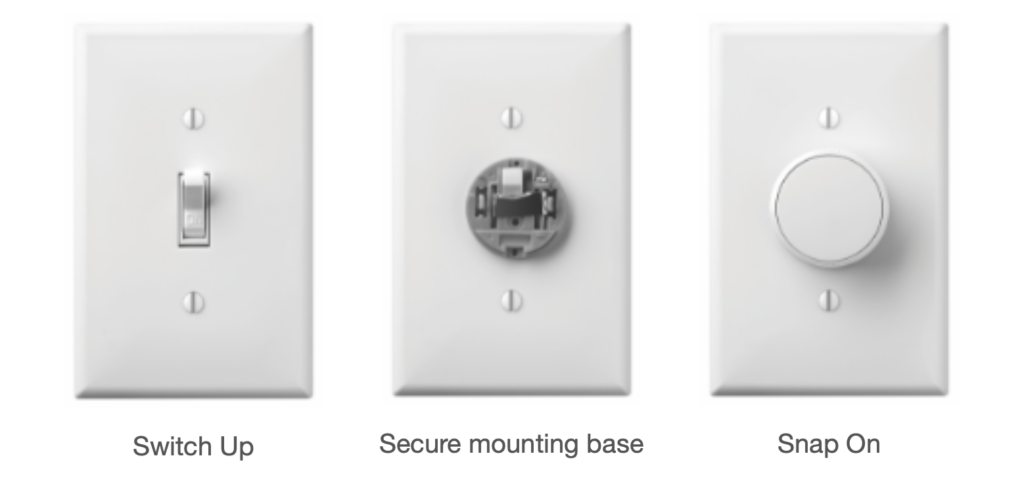
This small device connects to either a specific Phillips Hue bulb, room, or scene, and can control the lights by dimming them with the knob, or turning the lights off and on by pressing it.
Super Easy Installation
And the best part? SUPER simple installation. Put the mount on top of the switch, secure it with a couple twists of a screwdrivers, then snap the dimmer on top of it. It took me 2 minutes tops to install and connect the thing.
After trying it in my son’s room, I’m absolutely buying one for every room with smart lights.
If you are looking for a simple solution for your smart switch woes, I highly recommend the Lutron Aurora Smart Bulb Dimmer Switch.
- Don’t worry. Subscribe on YouTube and you’ll get a video soon. ?
- …and if it works with HomeKit, it almost definitely works with Alexa. ?
