
How to Manage Your Email for a Sane Holiday Season
Do you feel like you got way too many emails over the Black Friday / Cyber Monday weekend? I know lots of people who do. I also know lots of business owners who held back sending their own sequence of emails because they hate getting emails. And while that’s a different conversation1, you can draw a similar conclusion: when people get a lot of email, they feel it’s overwhelming.
It doesn’t have to be. Way back in 2010, I wrote about how you can easily manage subscriptions with GMail. Well, it’s been 10 years, and there are a lot more ways to control your inbox. Let’s take a look at some.
Understand the + Operator in GMail (and other email services)
I suspect most people are using GMail, and I outline the + operator (called “plus addressing”) in the above post. You add a plus sign after your gmail user name, then some key word (for example, jcasabona+deals@gmail.com). Then you can use filters to do what you want with those emails. This works for any email address using Google’s email service, whether it’s an @gmail.com address, or your own domain.
And while lots people, businesses, and institutions use GMail or Google Workspace2, Google isn’t the only the only email service that supports this. Microsoft’s Outlook is another major player that allows plus addressing.
I suggest even if you’re not using Google or Microsoft, you see if your email service allows plus addressing.
Use Filters Generously
With or without plus addressing, you can still use filters generously. I use them to remove any emails from specific senders, or even key words. For example, if you get lots of emails from a noreply@ email address, you can set up a filter like this:
from:(noreply@*)
…and they move it into a “NoReply” folder or even the trash.
For a long time I used filters to manage large aspects of my inbox:
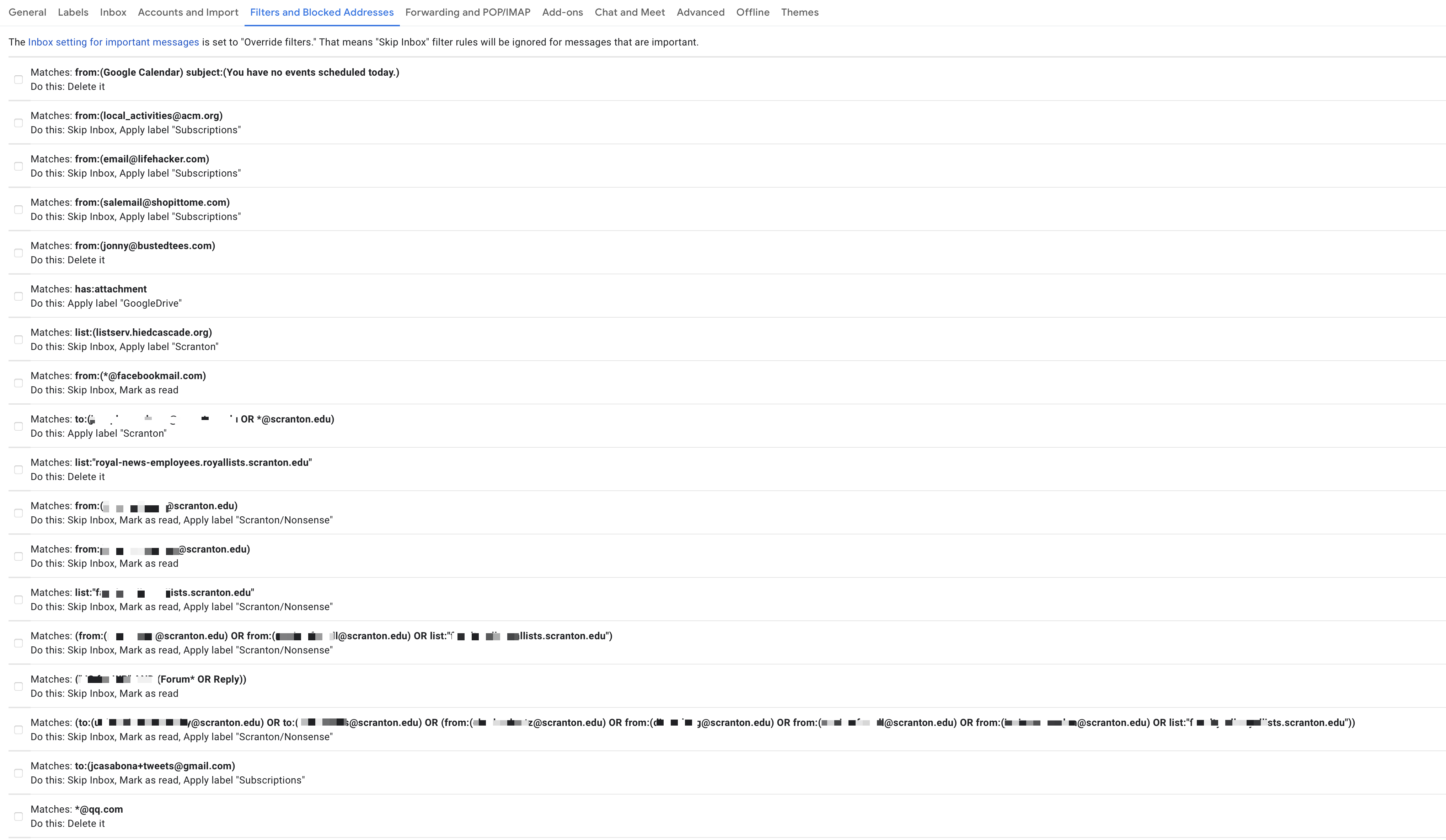
But now, I use a MUCH better too: SaneBox
SaneBox is the solution we all need
Full Disclose: SaneBox is a previous sponsor of both my podcast and my newsletter. But it’s honestly a service I can’t live without.
I’ve written several times about Sanebox, but I think this post is a good introduction. The great thing about SaneBox is that it’s automatic and uses a form of machine learning to sort your email, no matter what service or email client you use.
That means you don’t need to mess with filters, and you can teach it to automatically sort any plus addresses you happen to use. It can also sort based on sender, key words, and other more technical aspects of email.
My favorite feature is the Sane Black Hole, which you can read about above. But they also have a fantastic feature called Do Not Disturb. When you enable it, you can have any email that would go to your inbox sent to a folder for a selected period of time. At the end of that period, the emails are restored to your inbox.
I think SaneBox is the best solution for most people.
Don’t Check Your Email When You’re Not at Your Desk
If I’m being honest, the catalyst for this post was a reply to a tweet I got about not wanting to be bothered on the holidays. And I totally get that.
A couple of books have come out in recent years that have rallied against email, either outside of work, or all together. One is Make Time and the other is Cal Newport’s A World Without Email. Both of these books offer insight into how you can cut the email cord.
And while it’s easy to say, “just don’t check email,” that trigger is a pretty strong one, especially if you find yourself on your phone with some downtime. With that in mind, there are a couple of more extreme options if you’re not a fan of folders and filters.
- Have a separate email address for all marketing emails. This could be an old address you don’t use any more, or one you’ve set up specifically for this purpose. Then you can get whatever you opted in for, and only check that inbox when you want to.
- Delete the app from your phone. Even if you can’t escape email when you’re at your desk, you can when you’re away from it. Delete the app from your phone if you really don’t want to be bothered.
Unsubscribe!
Oh yeah…and you can always unsubscribe from those newsletters. If the businesses are anything like me, I’m happy to see unsubscribes. If people don’t want to hear from me, they shouldn’t have to.
Most email clients make it pretty easy to unsubscribe these days, even if the sender doesn’t.
Getting Emails may be the Problem, but There are Lots of Solutions
The fact of the matter is businesses will always send emails because they work. My 10 email sequence over the course of Cyber Week worked very well; I had more sales than unsubscribes. So I’ll be doing the same thing next year.
But I also have systems in place so that I only see those emails when I want to. Most marketing emails never make it to my inbox.
It can be the same way for you.
