
How to get Keyword Search for Safari Anywhere with TextExpander

I do a lot of searching directly from the address bar in whatever browser I happen to be in (usually Safari), so anything to make that process faster would be super swell. A while back, I learned about the Safari Keyword Search Extension from Six Colors, and decided to give it a try. It is incredible! Oh, and as of iOS 15, it works on iPhone and iPad too!

How It Works

Once you install the extension, it gives you a list of shorthand snippets for common searches. So far example, g Casabona would open a Google Search for “Casabona.” yt Baby Shark would open a YouTube search for…well you know.
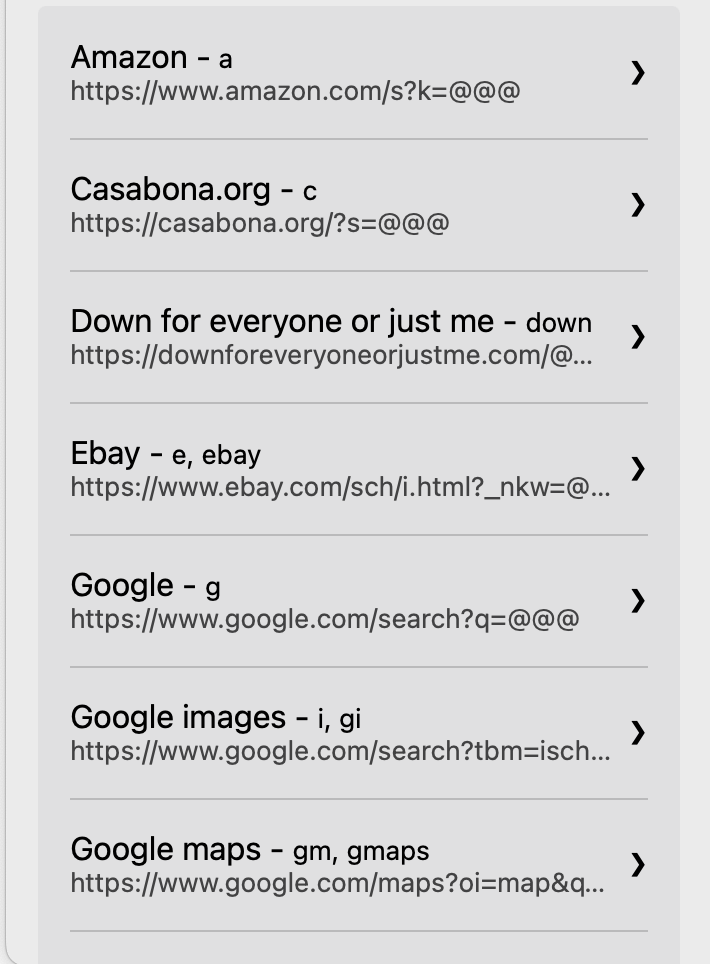
Keyword Search Extension
Some of the keyword searches I use.

But as you can see from the above screenshot, you can also add custom search. So I’ve added one for this site, as I’m often looking for links. I’ve also added one for searching Unsplash, and the LinkedIn Learning Library.

The only problem is, it appears, if you don’t use Safari you’re out of luck.

Using TextExpander Instead

There is another way though. If you use TextExpander*, you can get a decent replacement that is cross browser. Create a new snippet with the URL:

https://casabona.org/?s= and then a Single Text line fill in.

Expanding this will allow you to create the search URL. Then you can press Enter/Return. OR, you can simulate that click right in Text Expander. The final snippet will look something like this:
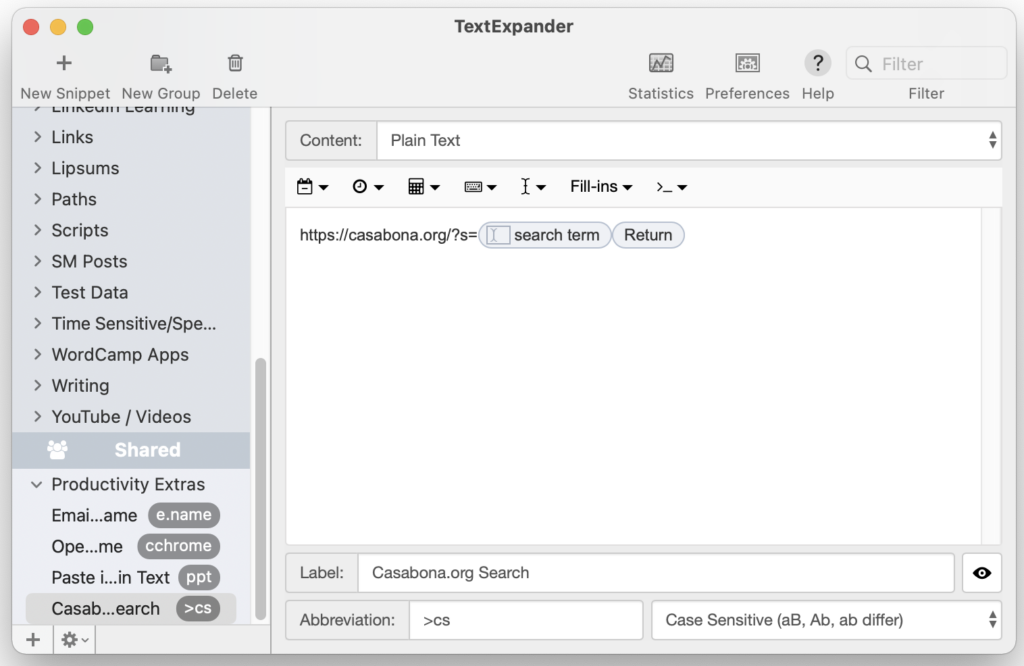
Search URL expansion in TextExpander

The only drawback is you’ll need to create separate snippet for each URL you want to search. You can join the Creator Crew to get my list in the Automation Library.

*Full disclosure: TextExpander is a current sponsor of my podcast, How I Built It.

Fast Searching!

Before this extension, I don’t think I realized how much I actually searched for stuff on places besides Google. It saves me a ton of time, and I know it will for you too.

Similar Posts

  • I’m Testing Pushcut Automations

    One of my goals has always been to figure out a straight-forward way to connect Zapier and Shortcuts.

    One of those ways is Pushcut, via a local automations server it runs constantly on a device. But until today I didn’t have a spare device…so now I’m testing the server.

  • | |

    Make vs. Zapier: Why I Moved

    January has come and gone, and I’ve made the decision to fully move from Zapier to Make. I’m pleased with the functionality, the workflows, and the considerable cost difference.
    Here are my thoughts after one month with Make.

  • |

    SaneBox Keeps my Inbox Clear and my Heart Rate Down (Friday Toolkit Preview)

    I’ve been thinking of doing something like this for a while, but haven’t pulled the trigger. I want to thank SaneBox for partnering with me to push me over the edge. This first edition of The Friday Toolkit is brought to you by them; I chose SaneBox as the partner because I’ve been using them all year and am a huge fan. I’m excited to share a little bit more about them.

  • Automatically Scheduling Podcast Guests with Calendly and Zapier

    Booking podcast guests can be a mess without the right tools. Missing one step can mean a bad recording, forgotten instructions, and unprepared interviewers. That’s why I’ve automated my entire guest booking process. I don’t forget anything, and I make sure guests are ready to record. Here’s how I do it.

  • |

    Quick Tip: Managing Subscriptions with Gmail

    Note: This article was published while I was in my early 20s. I was much younger and dumber. Please don’t hold it against me. One of the perils of having a 20+ year old website!It’s likely that you have several subscriptions to newsletters and email blasts from various websites. And if you’re anything like me,…