
Quick Tip: Turn off Amazon Wishlist Spoilers

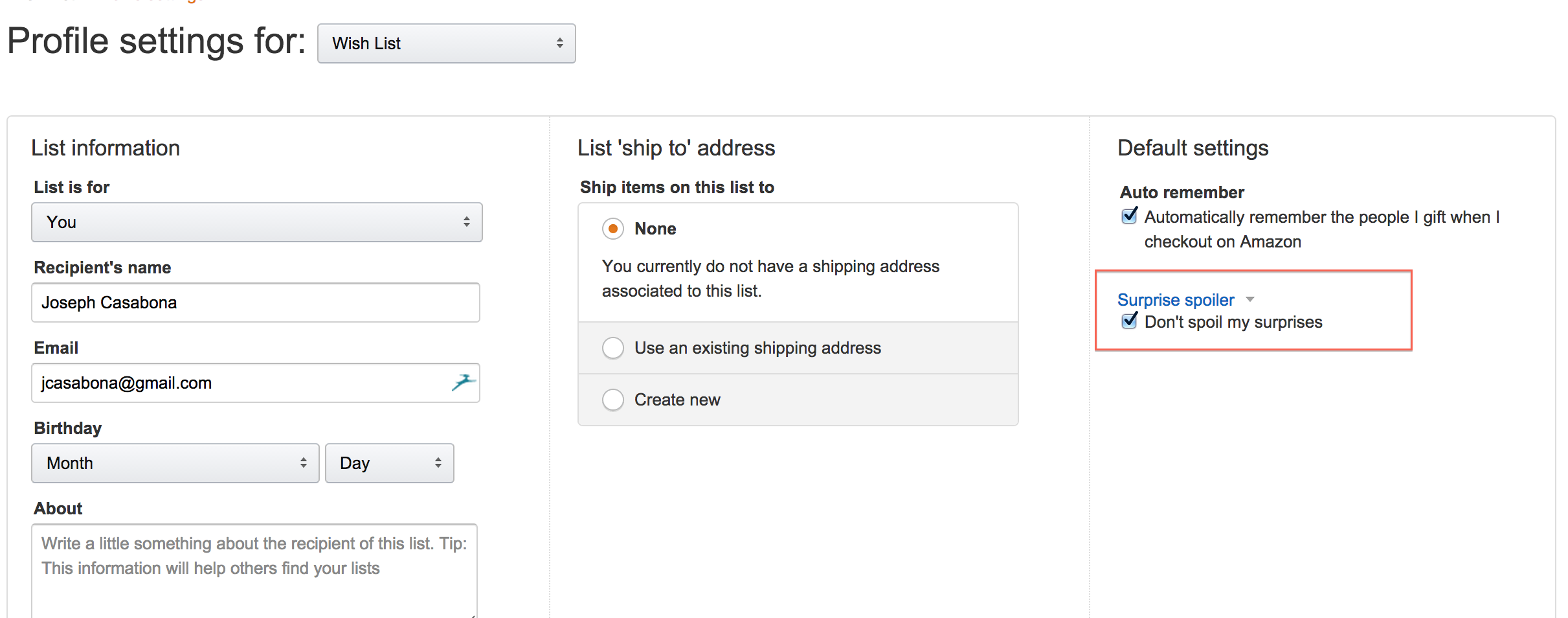
While talking to my mother, whom I sent my Amazon Wishlist to for gift ideas, she told me to not check Amazon until Christmas because she bought stuff off of my list and didn’t want me to see what she got. Luckily, Amazon has thought of this, and there is a really simple way to make sure that you don’t see when people buy things off your list.

  1. Go to your Amazon Wish List.
  2. In the List Actions drop-down (towards the top of the list, on the right), click Update list profile.
  3. Check  “Don’t spoil my surprises.”
  4. Click Save.

That’s it! You can now view your list without worry of spoilers.

Similar Posts

  • | | |

    Why iTunes Proves Apple is Only in it to Make Money

    Note: This article was published while I was in my early 20s. I was much younger and dumber. Please don’t hold it against me. One of the perils of having a 20+ year old website!I know what you’re going to say; “All companies want to make money.”  As a red-blooded, meat-eating, American capitalist, I think…

  • Droid Accessories

    Note: This article was published while I was in my early 20s. I was much younger and dumber. Please don’t hold it against me. One of the perils of having a 20+ year old website!To continue my love affair with the Droid, today I’m writing about the Droid accessories I use the most. I created…

  • |

    Make wp-caption the same (responsive) width as the Image

    I was working on a problem last week in WordPress where the caption for an image was extending the whole width of the container, not staying the width of the image. This make sense – the image is inside the .wp-caption container. So how to we fix it? Let me tell you!

  • |

    Quick Tip: How to Un-shrink a Sweater

    Note: This article was published while I was in my early 20s. I was much younger and dumber. Please don’t hold it against me. One of the perils of having a 20+ year old website!So this isn’t really tech related, but I’m a guy and not a very bright one at that. Last week a…