
| |

How to Add a Google Doc in a Specific Folder with Your Stream Deck

I’ve greatly improved my process for creating social media content in a centralized place.

The basic workflow is this:

  1. Create a Google Doc in a folder called “Social Posts”
  2. Kick off a Make automation that watches that folder, and adds a new entry to my “Social Media content” base in Airtable. A schedule date is also determined.

Then my VA goes in and reviews the documents, creating images as needed, and posting them on the scheduled dates.

Building the Google Doc URL

To make this even easier, I wanted to create a Stream Deck button to open a new document in that Google Drive folder1. Turns out, you can create a new file in a specific folder via a URL.

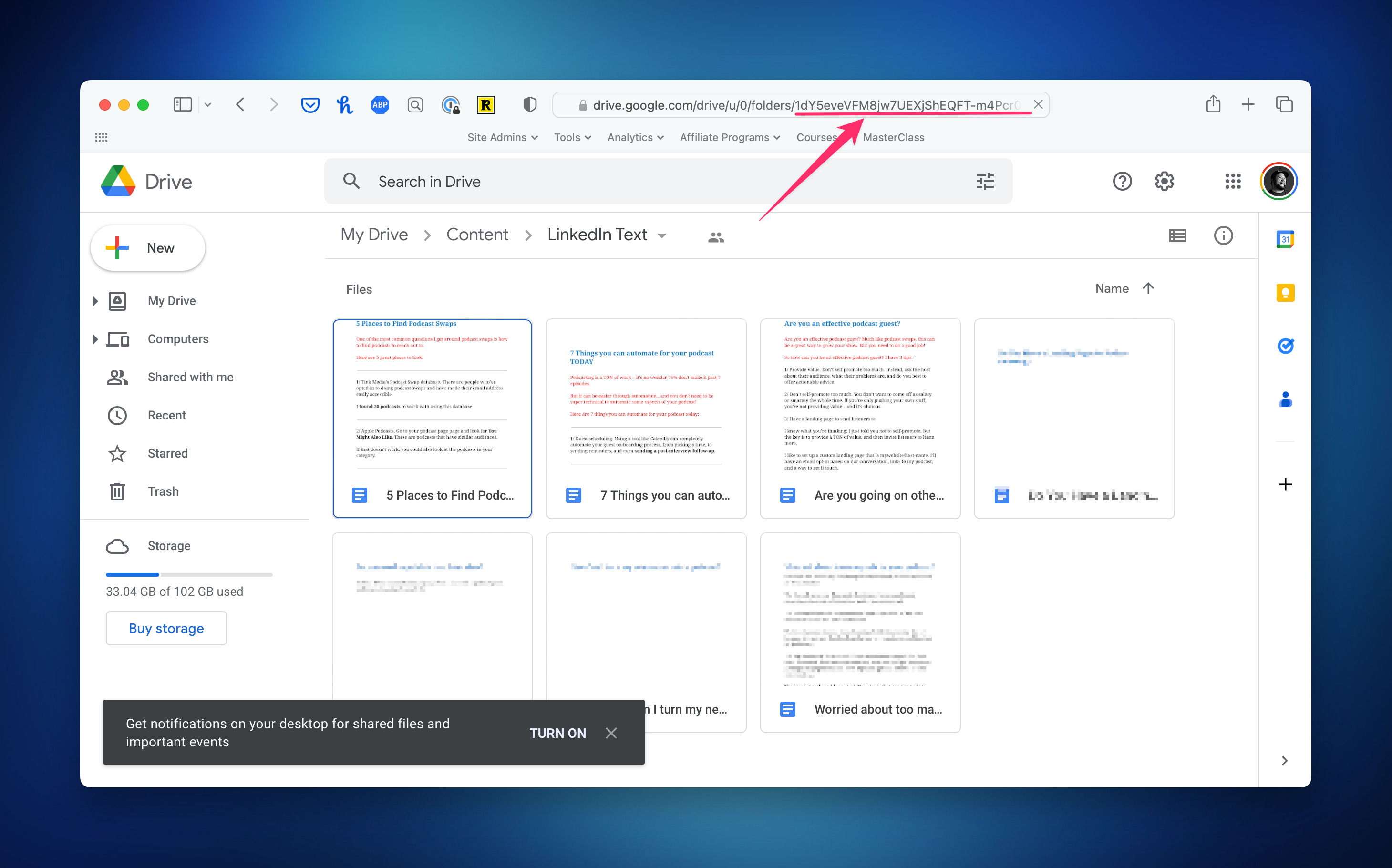
Here’s the URL Format: https://docs.google.com/document/create?usp=drive_web&folder=[FOLDER-ID].

And here’s where you get the FOLDER-ID:
Creating the Stream Deck Button

With that in hand, I have my URL. And I can easily launch this with my Stream Deck thanks to the “Website” action:
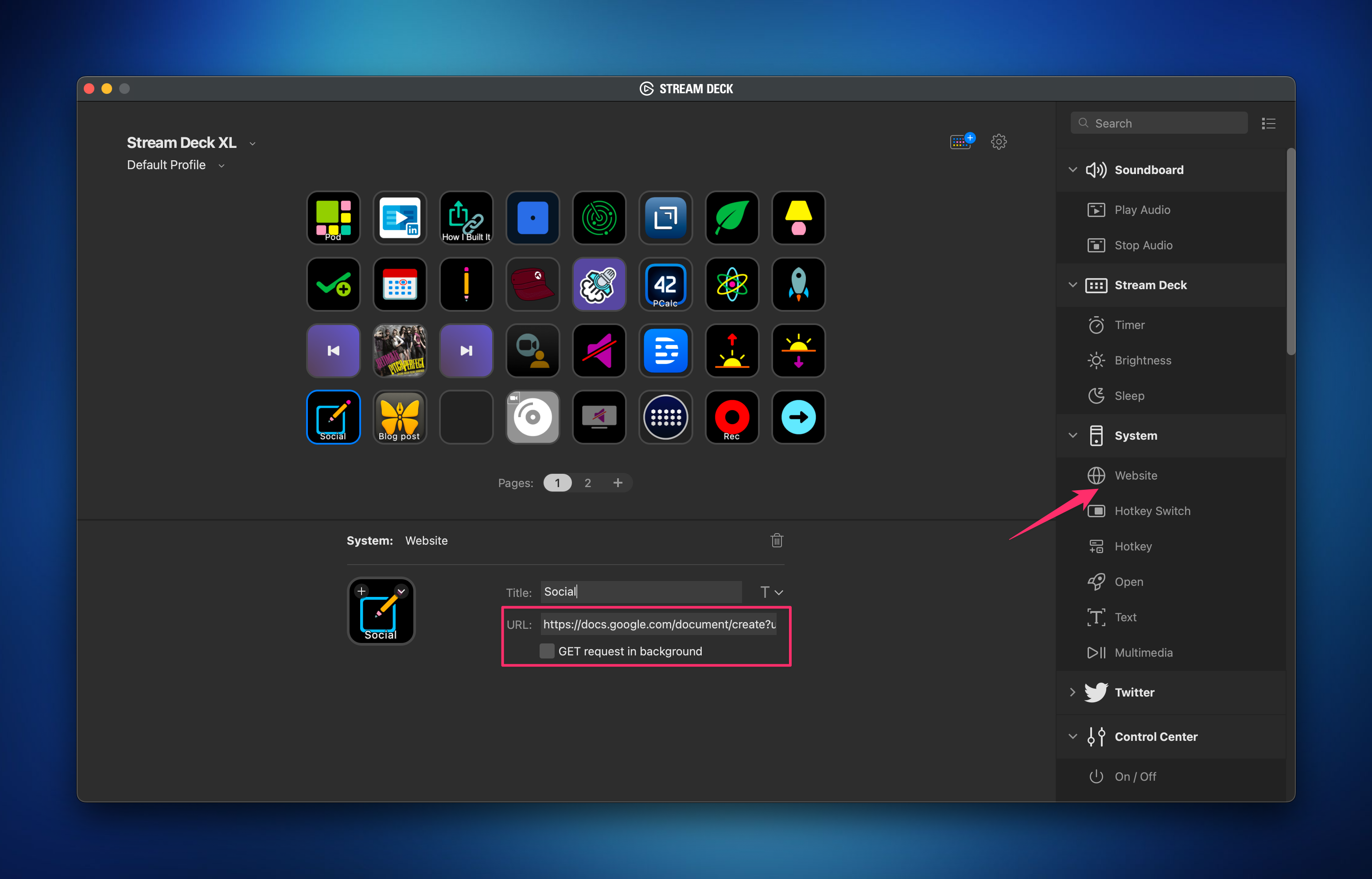
Now, whenever inspiration strikes, I push that button and start writing.

But I know what you’re thinking. “What about when you’re not at your Stream Deck?”

Sadly, because the Google Docs team apparently hates iOS, there is no native shortcut for Docs, and when you open that URL on mobile, it throws an error.

Instead what I do is dictate a new document using Drafts. Then Drafts has an action to save to Google Drive. It’s not perfect, but it works for now.

  1. The subtext here being I have this sort of automation for all things I want to quickly capture — ideas, notes, journal thoughts. ?

Similar Posts

  • |

    5 Functions You Should Consider Outsourcing

    In our daily lives, we outsource responsibilities and task management to apps. So when you want to find the time to grow your agency and create recurring revenue, why not outsource some of your business functions too? Here’s my list of the five functions you should be outsourcing.

  • |

    Quick Tip: Get a Family Cell Phone Plan to Save Money

    Note: This article was published while I was in my early 20s. I was much younger and dumber. Please don’t hold it against me. One of the perils of having a 20+ year old website!I was talking to a friend yesterday who told me his parents booted him and his brother off their family plan…

  • |

    How to Improve Audio Recordings at Home

    Recording audio at home can be tough, especially if you don’t have the environment. On top of that, what app do you use to record, and how can you prevent that “robot voice” that happens if you’re recording online with other people. Let’s take a look at a few helpful techniques.

  • |

    Quick Tip: How to Un-shrink a Sweater

    Note: This article was published while I was in my early 20s. I was much younger and dumber. Please don’t hold it against me. One of the perils of having a 20+ year old website!So this isn’t really tech related, but I’m a guy and not a very bright one at that. Last week a…

  • | |

    Why you should buy a laptop for college….

    Note: This article was published while I was in my early 20s. I was much younger and dumber. Please don’t hold it against me. One of the perils of having a 20+ year old website! I just read This- it’s entitled “Why you should not buy a laptop for college. Ok so this post isn’t…

  • |

    SaneBox Keeps my Inbox Clear and my Heart Rate Down (Friday Toolkit Preview)

    I’ve been thinking of doing something like this for a while, but haven’t pulled the trigger. I want to thank SaneBox for partnering with me to push me over the edge. This first edition of The Friday Toolkit is brought to you by them; I chose SaneBox as the partner because I’ve been using them all year and am a huge fan. I’m excited to share a little bit more about them.

5 Comments

Comments are closed.