
iPad Pro Gear That Helps Me Work
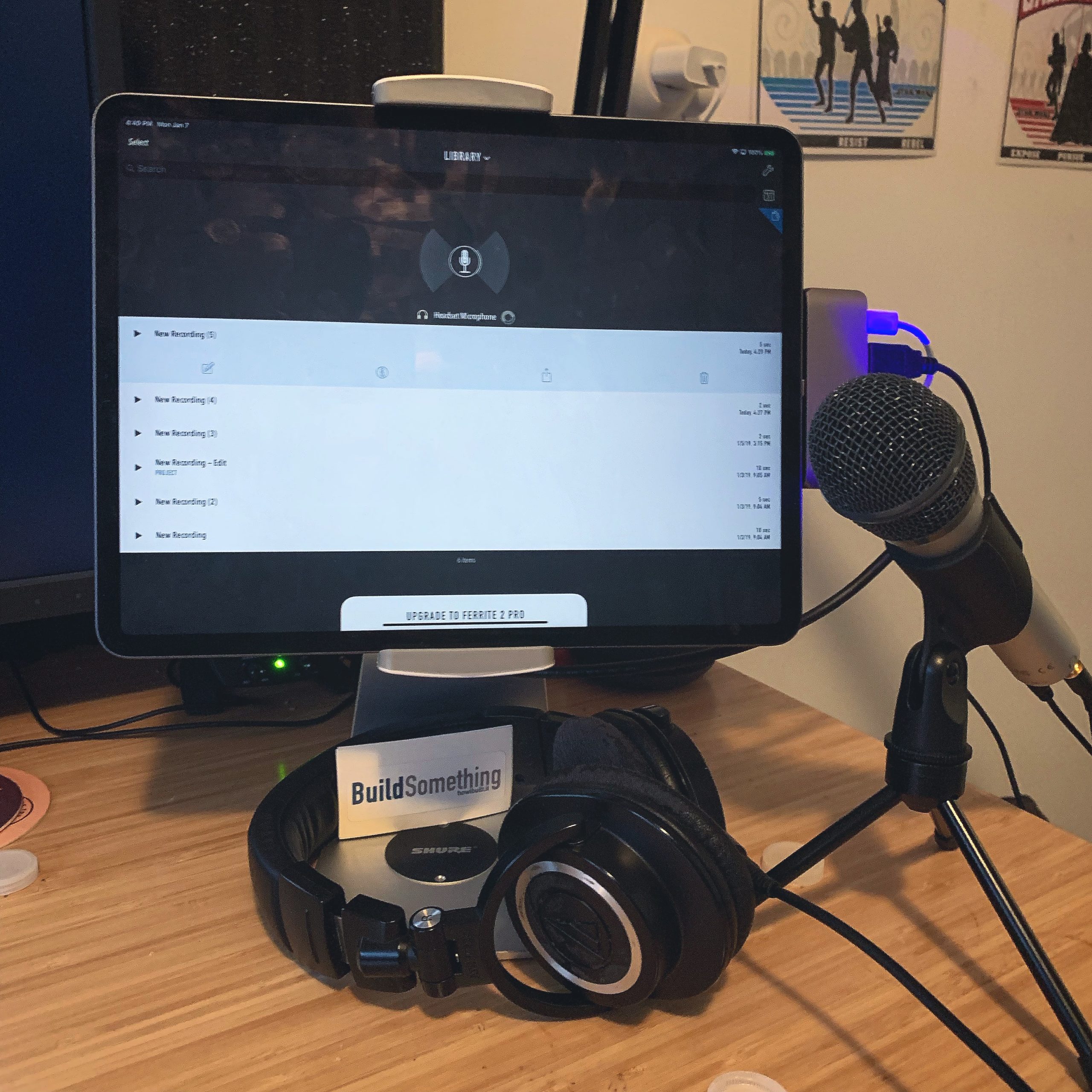
A couple of weeks ago I wrote about making my iPad Pro my travel laptop. In an effort to get comfortable with using the iPad regularly, I also try to spend some quality time on at when I’m at my desk. You’ve likely seen some photos of my desk set up with the iPad on it, and today I want to go through some of the gear I’m using to make the iPad feel more like a desktop.
This post is broken down into 3 sections:
- Current Desk Gear
- Current Travel Gear
- Wishlist / Next Purchases
Current Desk Gear
This is the most “complicated” of the 3 groups, naturally, because there’s more stuff to consider. I have a stand, a multi port hub, and some extras attached to this.
The stand is the Viozon iPad Pro Stand. It came recommended from a few sources, supports 9-13”, and swivels for some good flexibility in use. It’s also sturdy and has a wire wrangler opening in the back. My only wish is that instead of the 2 clamps it comes with (one for 9-10.5” iPads, one for the 12.9” iPad), one clamp could accommodate both. But I suspect I’d be sacrificing sturdiness.
The hub is the Satechi Aluminum Type-C Adapter. It’s pretty new as it came out in December, but it’s well made. I like that it sits flush against the iPad, even mounted, and doesn’t bend. It has ports for USB-C, USB-A, HDMI, and an audio jack. As such, I’m able to plug in my monitor, mic, headphones, and charge it all at the same time. Speaking of, here’s what’s plugged into the hub:
- BenQ 4K Designer Monitor: This is a pricy but really good monitor. It came recommended by Wirecutter, and what I really like about it is the built in KVM switch, so I can basically have 2 different computers and keyboards hooked up to it and switch between them seamlessly. This lets me use the monitor for both my desktop, and my iPad.
- ATR2100 USB Mic: I’m experimenting with doing more recording and editing from the iPad, and this mic is perfect for that.
- Standard USB-C Charging cable.
Finally, the last thing I have hooked up to the iPad at my desk is my Logitech K780 Bluetooth Keyboard. I love this keyboard because aside from having a number pad, it also has support for 3 devices. That means I can keep it connected to my desktop, my iPad, and even my phone and just press a button to switch between them. It makes using the mounted iPad very easy.
iPad Travel Gear
This section is decidedly less exciting, as I don’t have much. Aside from the new Apple Pencil (which I love and have been using more), I have:
- The Apple Keyboard Folio for typing on the go. I LOVE the sleek back and wrap-around design. The keyboard is the same as the older generations, and is just OK. I hate the $200 price tag. But it’s the only really good one available at the moment. More on that later.
- For keeping this thing charged on the go (something I don’t need to do very often), I have the Anker PowerCore+ 26800 Bank/Charger. It’s beefy, supports USB-C and quick charging, and has multiple ports. I love it.
- I also have a couple of USB-C to USB-C cables.
Wishlist / Next Purchases
There are a couple of things I plan on picking up very soon. One is a better keyboard, and I’m going with the Brydge Keyboard for the new iPad Pro. I’ve heard so many good things about this product, and got the 10.5” keyboard for Christmas. I also picked one up for my wife’s Surface Pro. Both have been great. They are sturdy and turn the iPad into a real laptop when I want that. They’re also bluetooth and have backlit keys, making it easier to work in low-light environments. I’ve already preordered it, and am looking forward to getting it in April.
The other is the Luna Display. Once I get my iMac Pro, I’m going to grab a Luna Display to add another montior in the form of my iPad. I have grand plans for making my mac an “app” on my iPad for when I really need to, or even picking up a Mac Mini for a home server and managing it from the iPad. But more on that in a different post.
An Ongoing Process
One of the fun parts of reading MacStories is the experiments the team conducts on maximizing productivity and trying new tools for the iPad. While I’m not going to the extent they do (though I’m open to it if anyone wants to send review units or sponsorship 😉 ), I’m really enjoying trying new hardware and apps to help me make the transition.

I have a Brydge already ordered. I couldn’t justify the price of the Apple keyboards and I’ve used a seperate Bluetooth one for a while with my 9.7 so I figured I could keep doing the same thing.
Why did you go with a hub that sits on the iPad? I went with the Kingston one that has a short cable. In theory when my stand comes in today I can attach it to the stand and then have to out of sight.
How useful do you really find the monitor since iOS has no support for it? I don’t even think that LumaFusion has support yet for a 2nd screen. I have had no desire so far to hook up to a screen.
Gotcha! I’m treating this mostly as my travel computer so I needed a keyboard that nicely attaches.
I like the way the the hub looks and figured in any case I’m running wires. I just wanted to reduce the chain a bit. Plus Viticci spoke highly of it!
The monitor is mostly at desk convenience- since I do have a bluetooth keyboard and my monitor takes up a good portion of my desk I just connect to it so I’m not straining my eyes or rearranging the stand to sit above the keyboard. I cannot wait until apps actually support multiple screens.
Once you get your iMac Pro?! What happened to the badass DELL Windows workstation setup?