Design | Quick Tips | Websites
Quick Tip: User Level Themes for Client Site Reviews in WordPress
Note: This article was published while I was in my early 20s. I was much younger and dumber. Please don't hold it against me. One of the perils of having a 20+ year old website!
 Recently I launched a couple of websites using WordPress and instead of using a temp directory for testing/client review, I used a plugin & theme instead. Using this technique I didn’t have to worry about moving directories, changing the WordPress directory/blog URLs, Â or checking image sources in posts. Here’s how I did it.
First of all, the two tools I used were User Level Themes plugin and any old Coming Soon Theme.
- Install both tools and activate User Level Themes
- Make your coming soon theme the default theme (Note: with User Level Themes, this won’t matter; but it will later when we deactivate User Level Themes)
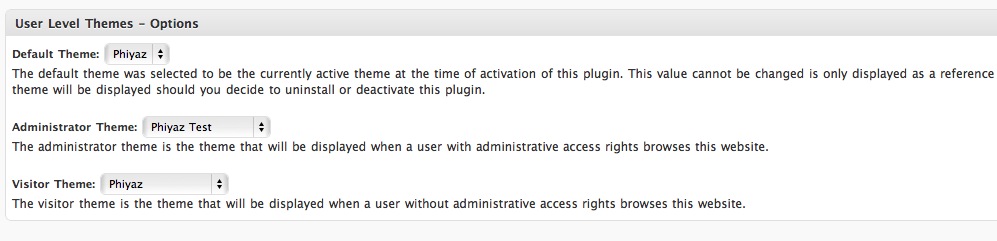
- Go to Appearance->User Level Themes and scroll down. You will see three options (screen shot below)
- The default theme will be your current default theme. Again, this won’t really matter while User Level Themes is active.
- For the Administrator Theme, make it the theme your developing. This theme will only be available to those who are logged in to WordPress.
- For the Visitor Theme, make it your coming soon theme. This is for anyone who is not logged in.
- Create a username and password for your client(s). Be sure to send instructions explaining that they must be logged in to see your theme.
- Once everything has been approved, deactivate User Level Themes (at this point your default theme wil take over) and change your default theme (Under Appearance->Themes) to your shiny, new, client approved theme.