
Use Input Masks for Better UX and Easier Validation
Recently I was developing a few forms for a project at work and wanted a fairly specific format for the input of one of the fields. It was a time of day, and since the <time> element isn’t very well supported in browsers yet, I opted for my own text input and validation. While I do provide some examples for users and check the input on the server side, I opted for input masks on the front end of development to make the form validation easier, and more importantly, to make using the form easier.
You can see what I did, as well as an implementation on CodePen. It’s also embedded below. The description in the pen is this:
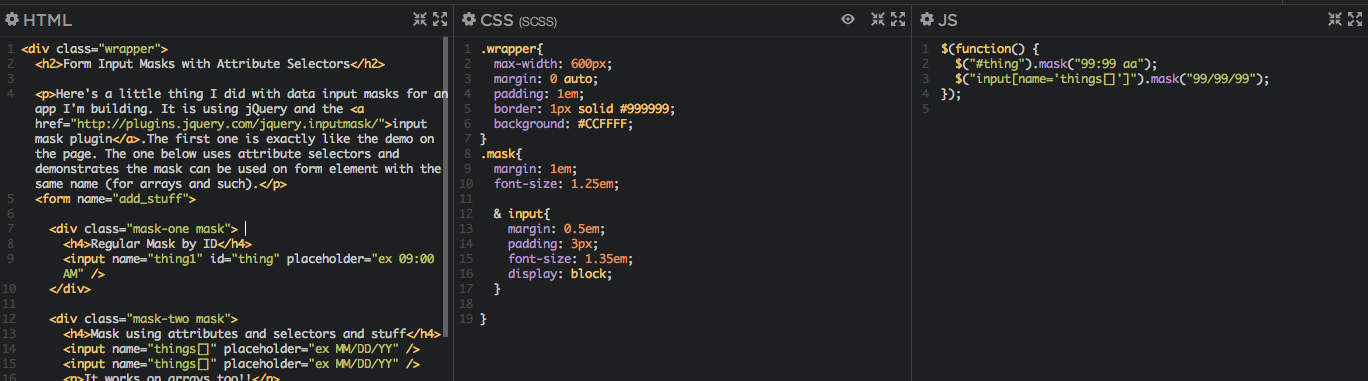
Here’s a little thing I did with data input masks for an app I’m building. It is using jQuery and the input mask plugin.The first one is exactly like the demo on the page. The one below uses attribute selectors and demonstrates the mask can be used on form element with the same name (for arrays and such).
In the original plugin documentation, it is suggested that IDs on the form elements are used; however, I was looking for a way to knock out a list of form elements that would be put into the same array (and therefore have the same name) without having to name them #id1, #id2, etc. Since jQuery breaks down the DOM extremely well, I was able to use input attribute selectors, similar to what you use in CSS, to have 1 line that will apply the input mask to all of the form elements.
The reason I used input masks, as stated before, is 2-fold. This was easier than parsing out the string in my validate function. Instead of breaking out the string (the same way I do in PHP already) to make sure the format is correctly, I use input masks to guide the user in the right direction. It also makes for a better User Experience; instead of users potentially entering the input incorrectly and then having to re-enter up to 10 different times of day, they know they are doing it right on the first shot.
The pen below is just a simple example of what input masks can do. The jQuery inout mask plugin comes with a bunch of different examples and common formats. I recommend you check it out!
[codepen_embed height=”600″ theme_id=”4667″ slug_hash=”sjGdq” default_tab=”result”]See the Pen <a href=’http://codepen.io/jcasabona/pen/sjGdq/’>Form Input Masks with Attribute Selectors</a> by Joe Casabona (<a href=’http://codepen.io/jcasabona’>@jcasabona</a>) on <a href=’http://codepen.io’>CodePen</a>.[/codepen_embed]
