
Setting All Videos To Show Controls In LearnDash
One of the biggest pieces of feedback I’ve gotten on my course videos in recent weeks was that the controls on my videos were hidden. To be honest, I didn’t realize students couldn’t scrub through videos, or rewind – I assumed everything was working! After looking through the LearnDash settings and not finding a global option, I decided to the problem with just a little bit of code.
TL;DR: The Code
So I’ll cut to the quick and give you code first. Read on to learn about it! This is the setting you want:
learndash_update_setting( get_the_ID(), 'lesson_video_show_controls', true ); The full code is in this public gist.
Updating the LearnDash Setting
A few months ago I dug through the LearnDash code for a similar plugin I wrote to convert ACF videos to native LearnDash videos. I figured there was a similar setting for video controls, and I was right. If you use the Chrome inspector, you can see the name of the control in the source.
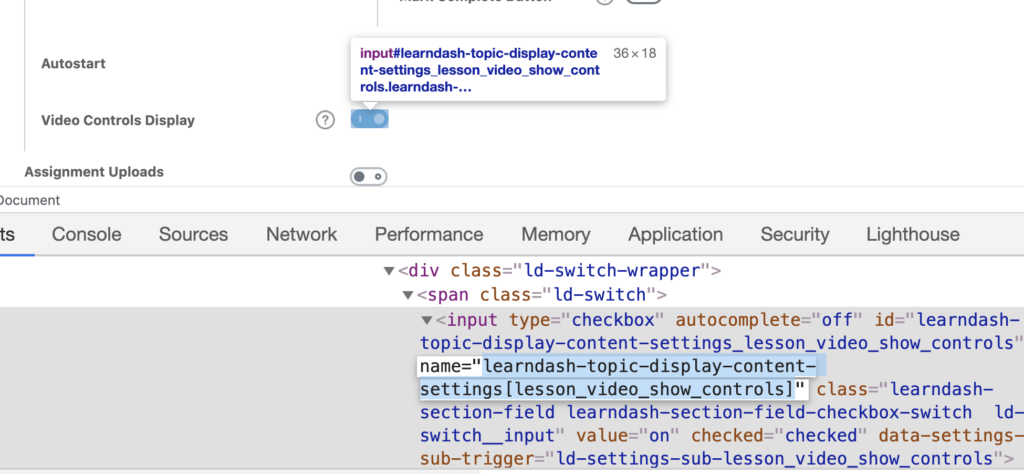
So I grabbed the name of that form field and fed it into the function I discovered earlier:learndash_update_setting(), which accepts a post ID, the setting name, and the value.
Confirming it worked for a single setting, it’s time to write the loop that would update all settings.
The Loop
I won’t dig into the full mechanics of the loop, but I do want to point out the custom post types I needed to update:
$lessons = new WP_Query(
    array(
        'post_type' => array( 'sfwd-lessons', 'sfwd-topic' ),
        'posts_per_page' => -1,
    )
);
I’m grabbing all posts that are lessons and topics within LearnDash. Then I loop through them all, updating the video controls settings.
This is slightly inelegant because I should really check to see if there is a video on the post before turning on controls, but it worked!
Hooking it in.
Now that we have a working function that will update all posts, we need to figure out where to hook it into WordPress. Honestly, there’s only one smart option for this, and it’s on plugin activation:
register_activation_hook( __FILE__, 'jc_swap_videos' ); This will ensure the code only runs once, when the plugin is enabled.
If you are adding it to your functions.php file or something like that, you should do it at a point where it won’t disrupt end users, so I would choose an admin hook, like admin_init.
I would also make sure it executes once, then comment out the action so it doesn’t run every time you load the admin.
Future Proofing
Now, this only counts for existing posts and not future lessons and topics you might add. I’d recommend toggling the option as you add the rest, but if you really want to make sure you don’t forget, you could repurpose the code to set the option on post save. Something like this will work:
function jc_set_video_controls_on( $post_id ) {
      learndash_update_setting( $post_id, 'lesson_video_show_controls', true );
}
add_action( 'save_post', 'jc_set_video_controls_on' );
What Do You Think?
When you take online courses, do you prefer video controls on? I sure do! As a course creator, what reasons do you have for turning them off? Let me know in the comments!

HI, that is great! where do I include this code in WordPress, should use the theme editor but what file should I edit to include this piece of code?